Hawk Laser Engrave File
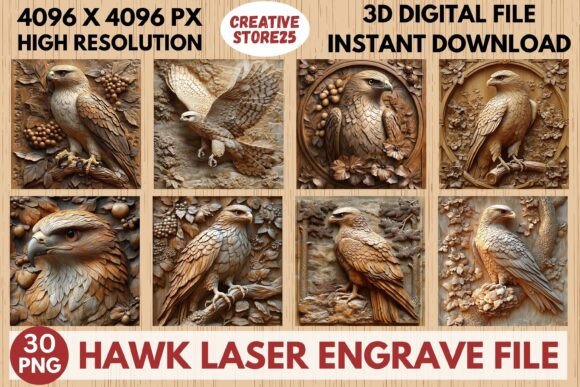
Transform your creative projects with this Hawk Laser Engrave File – Premium 3D PNG for Laser Engraving. Whether you are a seasoned woodworker, a small business owner looking to expand your product line, or a hobbyist just starting out with a new laser machine, the right digital asset can make the difference between a mediocre attempt and a professional-grade piece. This high-resolution file is designed specifically for precision laser engraving, offering sharp detailing that captures the majestic essence of the bird. It serves as an excellent go-to asset for home decor, wood art, stationery, textiles, tableware, prints, clothing, packaging, and more.
The core appeal of this premium grayscale PNG lies in its optimization for a wide range of laser engraving machines. From Lightburn and xTool setups to Glowforge and Sculpfun CO2 Laser Cutting Machines, this file is engineered to deliver consistent, high-quality output. For makers and engravers seeking to enhance their product offerings without spending hours creating vector graphics from scratch, this collection provides immediate value. You will receive a comprehensive package including 15 Coloring PNG Files and 15 Grayscale PNG Files, all at a stunning 4096x4096 resolution with transparent backgrounds. These files are ready to print and engrave, saving you time and ensuring compatibility with your existing workflow.
Understanding the Format: Why PNG Over SVG?
One of the most common points of confusion for beginners entering the world of laser engraving is the choice of file format. Many assume that an SVG (Scalable Vector Graphics) file is always superior because it is "vector." However, for complex shading, depth mapping, and photorealistic effects—especially when using dithering techniques in software like Lightburn—a high-resolution raster image like a PNG is often the superior choice. The Hawk Laser Engrave File leverages this advantage. By providing 4096x4096 pixel images, you retain enough data density to allow your laser to interpret subtle gradients and shadows accurately.
It is crucial to understand that these are not editable vectors. If you require the ability to resize individual feathers or change the color of the eye independently after purchase, this product is not for you. The files are static images. Resizing must be done by the buyer within their design software before sending the job to the laser. While modern software handles scaling well, enlarging a low-resolution image beyond its native dimensions will result in pixelation and poor engrave quality. Always ensure you are working with the original 4096x4096 source files to maintain clarity.
Avoiding Common Pitfalls in Laser Engraving Hawk Designs
Even with a high-quality asset like the Hawk Laser Engrave File, technical errors during the setup phase can ruin a project. Here are several frequent mistakes users make and how to correct them to ensure professional results.
- Ignoring Material Compatibility: Not all materials respond to laser engraving in the same way. Wood burns differently than acrylic, leather, or coated metals. Before starting, test your settings on a scrap piece of your chosen material. The contrast levels in the hawk’s feathers may need adjustment depending on whether you are engraving light birch plywood or dark walnut. A setting that works perfectly on one wood type might scorch another.
- Incorrect Image Contrast Settings: In software like Lightburn, importing a PNG requires careful adjustment of brightness and contrast sliders. If the image is too bright, the laser may burn through thin materials or fail to create sufficient depth. If it is too dark, fine details in the hawk’s face may be lost in shadow. Use the histogram feature in your software to analyze the tonal range and adjust until the highlights and shadows are balanced for your specific material thickness.
- Neglecting Focus and Power Calibration: A common oversight is assuming that power and speed settings remain constant across different batches. Environmental factors, lens cleanliness, and material variations can affect outcomes. Regularly check your focus distance and perform a power calibration test. For the detailed feathers in this design, inconsistent power delivery can lead to a muddy appearance rather than crisp lines.
- Overlooking DPI Requirements: While 4096x4096 is high resolution, it is only effective if your machine’s DPI (dots per inch) setting matches the intended output size. If you plan to engrave a large poster-sized piece, ensure your DPI setting in the software corresponds to the physical dimensions. Mismatched DPI settings can result in either overly coarse textures or unnecessarily long processing times.
Maximizing Versatility Across Projects
The versatility of the Hawk Laser Engrave File extends beyond simple wood plaques. Because the files come in both coloring and grayscale variants, you have flexibility in how you present the final product. The grayscale versions are ideal for traditional wood burning where natural tones are preferred, allowing the grain of the wood to interact with the engraved shadows. The coloring PNGs offer opportunities for mixed-media approaches, such as applying stain or paint over the engraved surface to highlight specific areas of the hawk’s plumage.
For entrepreneurs, this dual-format capability allows for a broader market reach. You can offer minimalist, natural-looking pieces alongside vibrant, artistic interpretations. Consider pairing the hawk design with other elements in your design software to create custom gift boxes, branded packaging, or personalized stationery. The transparent background ensures that you can overlay the hawk onto various layouts without unwanted white squares interfering with your composition.
Technical Checklist Before Purchase and Use
To ensure satisfaction and avoid frustration, please review the following checklist before downloading and using the Hawk Laser Engrave File:
- Verify Software Compatibility: Ensure your laser control software (Lightburn, RDWorks, etc.) supports high-resolution PNG imports. Most modern versions do, but older systems may struggle with 4096x4096 files.
- Check Storage Space: High-resolution PNGs are larger than standard vector files. Ensure you have adequate storage on your computer and USB drive for transfer.
- Understand Digital-Only Nature: This is a digital product only. No physical item will be shipped. Upon purchase, you will receive access to download the files immediately. Plan your project timeline accordingly.
- Review Licensing Terms: While you can use these files for personal projects and selling physical items created with them, always check the specific license agreement provided with the download. Typically, you cannot resell the digital files themselves or claim them as your own original artwork.
Final Thoughts on Elevating Your Craft
Incorporating the Hawk Laser Engrave File into your workflow offers a significant upgrade in visual impact and professionalism. The striking design, combined with the technical precision of 4096x4096 resolution, allows for intricate details that capture the viewer's attention. By avoiding common technical pitfalls and understanding the strengths of raster-based engraving, you can produce stunning results on wood, leather, glass, and more.
Whether you are crafting a unique gift, expanding your Etsy shop inventory, or simply exploring the capabilities of your laser cutter, this premium asset provides the foundation for success. Take the time to calibrate your machine, experiment with contrast settings, and let the detailed artistry of the hawk shine through. With proper preparation and respect for the material properties, you will achieve professional-quality outputs that elevate your next project to new heights.