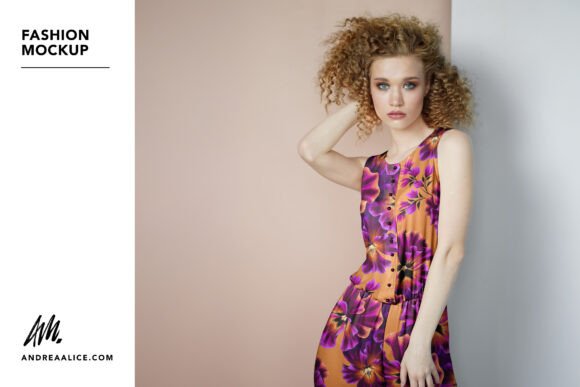
Woman in Jumpsuit Fashion Mockup
Designing for the fashion industry requires more than just a great concept; it demands a compelling way to present that vision. Whether you are an independent print-on-demand seller, a graphic designer building a portfolio, or a marketer launching a new clothing line, visualizing your artwork on real garments is crucial. This is where Fashion Mockup - Woman in Jumpsuit becomes an indispensable tool. It allows you to showcase your print designs in this women’s fashion mockup where you can add your own artwork to this chiffon jumpsuit with professional precision.
The jumpsuit is a versatile wardrobe staple, bridging the gap between casual comfort and chic elegance. By focusing on this specific garment type, this mockup offers a unique canvas that stands out from the typical t-shirt or hoodie presentations often seen online. It provides a sophisticated backdrop for your creativity, ensuring that your designs are viewed in the best possible light.
Why Choose a Chiffon Jumpsuit for Your Designs?
Choosing the right garment for your mockup affects how customers perceive the quality and drape of your design. A chiffon jumpsuit has a distinct flow and texture that adds depth to any pattern. Unlike rigid fabrics, chiffon moves, creating natural folds and shadows that make digital designs look incredibly realistic. When you use this Fashion Mockup - Woman in Jumpsuit, you aren’t just pasting an image onto a flat surface; you are placing your art into a dynamic, photorealistic environment.
This realism is vital for reducing return rates in e-commerce. Customers want to see exactly how a pattern will look when worn. The soft, flowing nature of the chiffon fabric suggests lightness and femininity, making it an ideal choice for summer collections, resort wear, or artistic prints that benefit from a sense of movement.
Key Features and Technical Capabilities
Understanding the technical backbone of the mockup helps you appreciate its flexibility. This resource is designed for efficiency without sacrificing control. Here is what makes it stand out:
- Editable PSD File: The primary file is provided in Adobe Photoshop format, ensuring compatibility with the industry-standard software used by most designers.
- Affinity Photo Support: Recognizing that not everyone uses Adobe, the package also includes an
.afphotofile. This means Affinity Photo users can enjoy the same high-quality results without needing a subscription to other software. - Smart Object Integration: Adding your designs takes seconds. Simply replace the smart object layer, and your artwork automatically conforms to the curves and folds of the jumpsuit. There is no need for manual warping or distortion tools.
- Customizable Elements: The color or pattern of the jumpsuit itself can be changed. If you want to show your design on a black chiffon versus a pastel pink, you can do so easily. Additionally, the color of the buttons can be adjusted to match your brand aesthetic.
- Realistic Lighting: Lighting and shadows are automatically applied to your designs for a photo-realistic look. This eliminates the "floating image" effect that plagues low-quality mockups.
- High Resolution: The final output is a crisp 4000 x 6000 px file. This resolution is perfect for large-format printing, detailed web displays, and high-DPI social media posts.
Guidance for Precise Artwork Placement
One of the most helpful aspects of this mockup is the inclusion of guidelines. If you are designing a complex pattern that needs to align perfectly across seams, these guides show you exactly where to position your artwork for each section of the garment. This feature supports designers who require exact placement specifications, ensuring that your creative intent is preserved in the final presentation.
For those who prefer a more organic approach, the smart object handles the wrapping seamlessly, allowing you to focus on the overall composition rather than the technicalities of layer masking.
Practical Use Cases for Creators and Businesses
The versatility of Fashion Mockup - Woman in Jumpsuit extends across various professional and personal contexts. Here are some practical ways to utilize this resource:
- Online Store Advertising: Use this mockup to advertise prints in your online store. High-quality visuals build trust and increase conversion rates. A well-presented jumpsuit design looks premium and ready-to-wear.
- Professional Design Portfolios: Showcase your work in a professional design portfolio. Instead of showing flat vector files, present your designs as they would appear in real life. This demonstrates your understanding of garment fit and fabric behavior.
- Social Media Marketing: Create eye-catching images for social media. Platforms like Instagram and Pinterest thrive on vertical, high-impact visuals. The 4000 x 6000 px dimensions are ideal for full-screen mobile viewing, grabbing attention in crowded feeds.
- Client Presentations: Freelancers and agencies can use this to pitch concepts to clients. Visualizing the final product helps clients approve designs faster, streamlining the feedback loop.
- Educational Demonstrations: Educators and hobbyists can use the mockup to teach principles of textile design, showing students how patterns interact with different fabric drapes.
Compatibility and Ease of Use
A common concern for users is software version compatibility. This mockup does NOT utilize 3D functionality, which means all my mockups are compatible in both the new and older versions of Photoshop. You do not need the latest Creative Cloud subscription to use this effectively. Furthermore, because the lighting adjustment layers are fully customizable, you can edit them to suit your specific artwork. If your design is dark and moody, you can adjust the shadows; if it is bright and airy, you can lighten the highlights. This level of control ensures that the mockup adapts to your art, not the other way around.
Photography and Aesthetic Quality
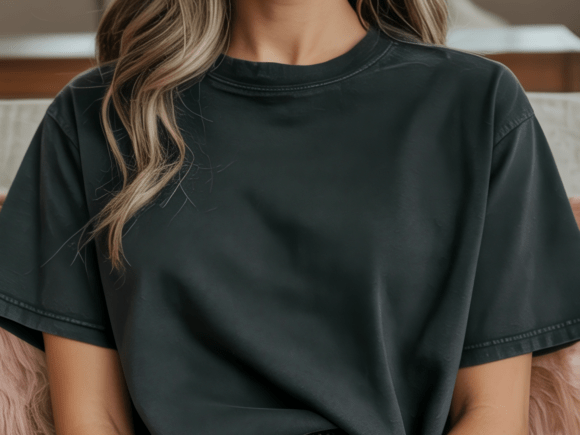
The foundation of any good mockup is the source photography. Photography credit thank you to Dmitry Vechorko for capturing the model in such a natural, elegant pose. The lighting in the original photograph is balanced to highlight the texture of the chiffon without overpowering the subject. This neutral yet stylish background ensures that the focus remains squarely on your printed design. The model’s posture is relaxed, conveying confidence and ease, which subtly influences the viewer’s perception of the clothing.
Important Considerations Before You Start
While this tool is powerful, there are a few things to keep in mind. First, ensure your source artwork is high-resolution. Since the mockup outputs at 4000 x 6000 px, starting with a low-res image may result in pixelation when scaled up. Second, remember that while the mockup applies realistic shadows, it simulates a specific lighting setup. If your design has very specific lighting requirements (such as neon glows), you may need to tweak the adjustment layers manually to maintain realism. Finally, always check the license agreement for commercial use, especially if you plan to sell the mockup itself, though using it to display your own products is typically permitted.
Conclusion
In the competitive world of fashion design, presentation is everything. Fashion Mockup - Woman in Jumpsuit offers a streamlined, professional solution for displaying your creations. By combining technical ease with photorealistic detail, it bridges the gap between digital design and tangible product. Whether you are showcasing your work in a professional design portfolio, advertising prints in your online store, or simply experimenting with new patterns, this mockup provides the perfect stage. With support for both Photoshop and Affinity Photo, customizable lighting, and precise alignment guides, it empowers creators of all skill levels to present their art with confidence and clarity.