Dragon Wall Clock SVG for Laser Cutting: A Versatile Design for Creative Projects
If you're someone who enjoys crafting, designing, or running a small business, you might already be familiar with the power of laser cutting. It's a precise and efficient way to bring your ideas to life, whether you're working with wood, acrylic, or metal. One standout design in this space is the Dragon Wall Clock SVG for Laser Cutting. This digital download offers a unique and eye-catching clock face that’s perfect for both personal and professional projects. Let’s dive into what makes it special and how it can fit into your workflow.
What Is the Dragon Wall Clock SVG?
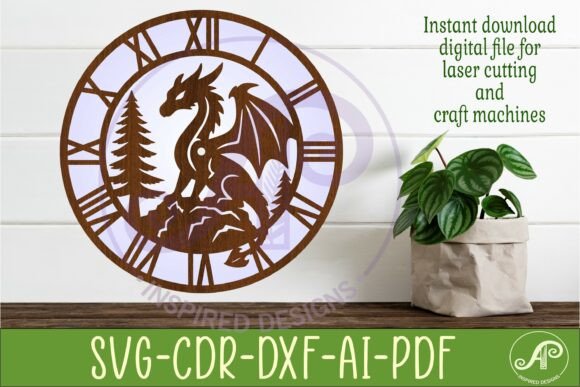
The Dragon Wall Clock SVG is a handcrafted digital template specifically designed for use with laser cutting machines. It includes three different wall clock face designs featuring a dragon motif — a symbol of strength, wisdom, and creativity. The files are available in multiple formats such as SVG, DXF, AI, PDF, and CDR, making them compatible with most software used in laser cutting and CNC routing.
This set comes in a single zip folder, ready for immediate use. The recommended size for cutting is between 25cm and 50cm, with the default dimensions saved at 29cm (11.4 inches) wide. Each file has been tested on platforms like LightBurn and created using CorelDraw, ensuring smooth integration into your existing tools. The center hole is precisely 8mm thick to accommodate standard clock hands, which means you don’t have to worry about resizing or adjusting anything manually.
Who Can Use This Design and Why?
While the Dragon Wall Clock SVG is ideal for anyone with access to a laser cutter, its appeal stretches far beyond hobbyists. Here’s a closer look at who might find it useful and why:
- Crafters and Makers: If you’re into DIY home decor, this design adds a mythical touch to your creations. Whether you're making custom gifts or updating your living room, the dragon theme brings personality and charm.
- Entrepreneurs and Small Business Owners: You can create unique products to sell online or in local markets. Custom wall clocks make excellent home décor items and can be personalized with names or dates for an extra touch.
- Design Educators: Teaching students about vector graphics and laser cutting? This template serves as a practical example of how to prepare scalable, high-quality files for real-world applications.
- Freelance Artists and Graphic Designers: Add this to your portfolio or client offerings. The versatility of the file types allows you to modify the design easily to suit specific branding or aesthetic needs.
Real-World Applications of the Dragon Wall Clock SVG
Let’s break down some of the ways people actually use this design in their everyday work or hobbies:
Home Décor and Personal Projects
Imagine hosting a themed party where every detail matters. You could laser cut the dragon clock onto a wooden board and hang it as part of the décor. Its intricate details pop against natural materials like walnut or oak, adding a rustic yet magical vibe. For those who enjoy upcycling furniture, replacing an old clock face with this design gives a fresh, modern twist while retaining the original frame.
Commercial Products and Retail Sales
A boutique shop owner looking to stand out from mass-produced items can use this design to offer something truly unique. By cutting the dragon clock onto various materials — think acrylic for a sleek look or metal for durability — they can cater to different customer tastes. These clocks also make great wedding favors or anniversary gifts when customized with meaningful text or dates. The ease of importing these files into laser cutting software streamlines production, allowing for quick turnaround times and consistent quality across batches.
Educational Workshops and Tutorials
In a design class or workshop setting, the Dragon Wall Clock SVG becomes a teaching tool. Students can learn how to scale vector files, adjust spacing for engraving, and understand the importance of precision when preparing files for laser machines. The multi-format availability means instructors can demonstrate compatibility across different software, giving learners a broader understanding of industry-standard tools.
Event and Exhibition Displays
Event planners often need visual elements that grab attention without being overwhelming. A dragon-themed wall clock placed strategically in a venue can serve as a conversation starter. At art exhibitions or cultural festivals, it can even represent a deeper meaning — perhaps symbolizing protection or prosperity. The ability to print instructions via the included PDF ensures that setup remains hassle-free, even under tight deadlines.
Practical Tips Before You Get Started
Before downloading the Dragon Wall Clock SVG for Laser Cutting, consider a few key factors to ensure a smooth experience:
- Material Choice: While the design is highly detailed, not all materials will showcase it equally well. Acrylic is transparent and vibrant, while wood adds warmth and texture. Test a sample if you’re unsure which material works best for your vision.
- Machine Compatibility: Make sure your laser machine supports the file formats you plan to use. The DXF and SVG files are particularly popular among laser cutters, but having an AI or CDR version provides flexibility for users with Adobe Illustrator or CorelDraw setups.
- Scale Appropriately: Although the default size is 29cm, feel free to resize the design based on your project’s needs. Just remember that scaling affects the thickness of the lines and the accuracy of the center hole. Always double-check measurements before cutting.
- Download Immediately: As a digital product, the Dragon Wall Clock SVG is delivered instantly after purchase. You’ll receive a link to a zip folder containing all the necessary files, so you can start working right away — no waiting for shipping or packaging.
How Different Users Benefit from This Design
Here’s how various users might benefit from the Dragon Wall Clock SVG depending on their situation:
Hobbyist Woodworker: You love creating things in your garage or workshop. This design allows you to craft a custom clock without needing advanced graphic design skills. Simply import the file into your laser software, choose your favorite wood type, and let the machine do the rest. The result is a stunning piece that you can proudly display or give as a gift.
Small Business Owner: You run a shop selling handmade goods and want to expand your product line. With this design, you can produce clocks quickly and consistently. Since it's a digital download, there’s no inventory to manage — just a ready-to-use file that helps you turn ideas into profit faster.
Gift Shop Manager: Your store specializes in novelty gifts and seasonal décor. The dragon motif aligns perfectly with fantasy or Halloween themes. You can tweak the design to match current trends, add holiday greetings, or incorporate company logos, turning a simple clock into a branded keepsake.
Interior Designer: You’re hired to decorate a client’s new office or home. Instead of going with generic clock options, you can commission a custom dragon wall clock that reflects the client’s personality or brand identity. The clean lines and bold imagery make it suitable for both modern and traditional spaces.
Why Choose SVG Over Other Formats?
SVG stands for Scalable Vector Graphics, which is crucial when working with laser cutters. Unlike raster images (like JPEGs or PNGs), vector files maintain clarity at any size. That means you can scale the Dragon Wall Clock SVG up or down without losing detail — perfect for experimenting with different sizes or adapting it to fit unusual spaces.
Having the design in both filled and outline SVG formats gives you more creative control. You can choose to engrave the design directly onto the surface or cut it out for layered effects. And because the file includes everything you need — from the clock face to the hole for the hands — you won't waste time trying to figure out how to complete the design manually.
Getting the Most Out of Your Files
To get started, extract the contents of the zip folder and open the file type that matches your software. If you’re using LightBurn, the SVG format is likely your best bet due to its seamless integration. For CorelDraw users, the CDR file offers full editability, allowing you to customize colors, add text, or merge with other elements for a cohesive look.
Once you’ve imported the file, take a moment to review the layers and settings. Some versions may include guidelines or test cuts to help you fine-tune the placement. After you’re satisfied with the layout, connect your laser cutter and start cutting. With proper calibration, you should end up with a clean, crisp design that’s ready for assembly.
Final Thoughts on Realistic Uses
When choosing a design like the Dragon Wall Clock SVG for Laser Cutting, it's important to think beyond aesthetics. How will it function in the space? What story does it tell? Will it hold up over time? These questions guide the best results. Whether you're building one for yourself or producing dozens for sale, this design offers a balance of form and function that’s hard to beat.
Its adaptability makes it a go-to option for many creators. From weekend warriors to seasoned designers, the Dragon Wall Clock SVG fits into a variety of workflows. And because it’s a digital-only product, you avoid delays and unnecessary costs — just pure creativity at your fingertips.
So next time you're planning a project and want to add something memorable, consider the Dragon Wall Clock SVG. It’s not just another template; it’s a foundation for bringing your ideas to life in a way that feels both authentic and professional.