Elephant Vector Files for Laser Cutting: A Practical Guide for Creative Projects
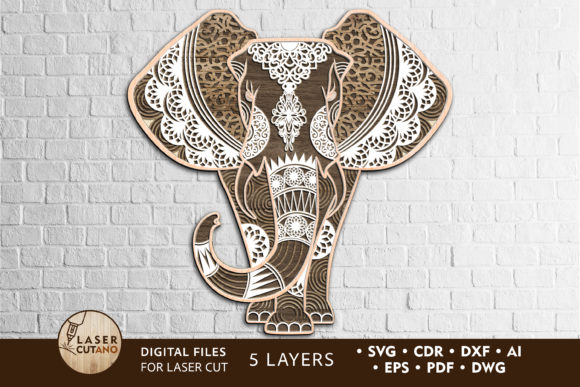
Elephant vector files for laser cutting offer a unique and versatile way to bring artistic and functional designs into your home or business. These digital templates are specifically crafted for precision cutting using laser machines, CNC routers, and similar tools. Whether you're a seasoned woodworker, an educator looking for classroom projects, or a hobbyist exploring new creative avenues, the ELEPHANT Multilayer Laser Cut design is a fantastic starting point. With its four-layer structure, it’s ideal for creating 3D wall art, decorative objects, or thoughtful gifts that stand out in both style and craftsmanship.
What Are Elephant Vector Files for Laser Cutting?
Elephant vector files for laser cutting are scalable, high-precision digital blueprints of an elephant figure designed to be cut from various materials like plywood, MDF, acrylic, cardboard, or even metal. The multilayer format adds depth and dimension to the final product, transforming flat material into eye-catching 3D art when assembled correctly. These files come in multiple formats such as .AI, .SVG, .DXF, .DWG, .CDR, .EPS, and .PDF, making them compatible with most design and cutting software.
The beauty of these files lies in their adaptability. You can customize the design before printing or cutting, allowing you to tailor colors, sizes, and layer arrangements to suit your vision. Once downloaded, they’re ready to use—just unzip the provided .zip file and select the appropriate format for your machine.
Common Mistakes When Using Elephant Vector Files for Laser Cutting
While the concept of laser-cutting elephant designs is exciting, there are several pitfalls that users often encounter. Avoiding these mistakes can save time, money, and frustration:
- Ignoring Material Thickness Requirements: The recommended thickness for wood is between 3–6 mm (approximately 1/8in–1/4in). Using thinner or thicker material than suggested may result in broken pieces or poor alignment during assembly.
- Scaling Down Without Adjusting Details: If you reduce the size of the design too much, thin elements like the elephant's trunk or legs might become fragile and difficult to handle after cutting. Always consider the structural integrity of the piece before resizing.
- Not Preparing Files Properly: Failing to unzip the folder or not checking all included layers before starting the project can lead to incomplete parts or mismatched sections. This is especially important when working on multi-layered models.
- Skipping the Painting Step Before Assembly: Each layer should be painted individually before gluing. Many beginners paint after assembly, which makes it harder to access inner parts and results in a less polished finish.
- Using Incompatible Software Formats: Not verifying whether your machine supports the file format you’ve selected can cause errors during the cutting process. Always double-check compatibility before importing the design.
How These Mistakes Can Impact Your Project
Making any of the above errors can significantly affect the outcome of your elephant laser cut design. For example, if you choose a material that’s too thick, your machine may struggle to cut cleanly through each layer, increasing the risk of overheating or damaging the tool. Similarly, scaling down without considering delicate features could lead to a finished product that lacks detail and looks unprofessional.
Painting after gluing also leads to uneven color application and difficulty in correcting small imperfections. On the other hand, improper file preparation might mean having to repeat the entire cutting process due to missing or corrupted data. These issues not only waste resources but can also impact the quality and presentation of your finished work.
Practical Tips for Success
To ensure your elephant vector files for laser cutting turn into a stunning final product, follow these best practices:
- Choose the Right Material: Stick to the recommended materials—plywood, MDF, acrylic, plexiglas, metal, cardboard, or paper. For wood, aim for 3–6 mm thickness to maintain durability and ease of handling.
- Plan Your Scaling Carefully: If you want to adjust the size of the elephant design, do so while keeping the proportions and structural balance in mind. It’s safer to scale up rather than down, especially if you're unsure about how thin components will hold up.
- Check All File Layers: Before starting the cutting process, open each file format in your preferred design software and verify that all four layers are present and aligned correctly. Missing or misaligned layers can ruin the 3D effect.
- Paint First, Glue Later: Apply paint or stain to each individual layer before assembling. This ensures full coverage and gives you more control over the final appearance. Use water-based paints for easier cleanup and better adhesion.
- Optimize Machine Settings: Different materials require different laser settings. Consult your machine manual or do a test cut on scrap material to find the right power and speed for clean, precise cuts.
Realistic Examples and Better Approaches
Imagine you're preparing to create a custom elephant sculpture for a client. You decide to scale the design down by 50% to fit a smaller space. However, after cutting, you notice that the elephant’s ears and tail are too fragile and break easily. By instead opting for a 75% reduction and reinforcing those thin areas with extra bracing or thicker material, you preserve the visual appeal while ensuring the model remains sturdy.
Another scenario involves a DIY enthusiast who neglects to check the file formats before purchasing. They end up with an .AI file but don’t have Adobe Illustrator installed. To avoid this, they should either confirm they have the necessary software or convert the file using free online tools or alternative programs like Inkscape or CorelDRAW.
Things to Check Before Starting Your Project
Before downloading or using elephant vector files for laser cutting, take a moment to evaluate the following:
- Machine Compatibility: Ensure your laser cutter or CNC router supports the file formats included (.AI, .SVG, .DXF, etc.).
- Layer Count and Design Complexity: The four-layer design offers depth, but more complex models may require additional attention during assembly.
- Material Quality and Thickness: Cheap or improperly sized materials can compromise the aesthetics and functionality of the finished product.
- Design Customization Options: Some sellers allow color changes or personalization; look for these options to enhance the uniqueness of your creation.
- Instructions and Support: Reliable sellers provide clear guidelines on how to assemble and finish the design. Make sure these are included in the package.
Why Elephant Vector Files for Laser Cutting Are Worth Exploring
These files are more than just a template—they're a foundation for creativity. Because they’re pre-designed and optimized for laser cutting, they eliminate much of the guesswork involved in creating 3D shapes manually. This allows you to focus on customization and presentation, making the project both efficient and rewarding.
They’re also great for educational purposes. Teachers and students can use them to learn about layering, geometry, and spatial awareness in design. For entrepreneurs and Etsy sellers, offering customized elephant laser cut kits can attract buyers looking for meaningful, handmade gifts or decor items.
With proper planning and execution, you can transform these digital files into beautiful, professional-grade art pieces that impress clients, customers, or loved ones. Whether displayed in your living room, sold at a craft fair, or used in a classroom setting, the ELEPHANT Multilayer Digital Laser Cut design provides endless possibilities.
Final Thoughts
Elephant vector files for laser cutting are a powerful resource for anyone interested in combining art and technology. By understanding common errors and taking proactive steps to avoid them, you can maximize the value of your investment and enjoy a smoother, more successful crafting experience. Remember, the key to a great finished product lies in careful preparation, choosing the right materials, and respecting the design’s structure.
So go ahead—explore the ELEPHANT Multilayer Laser Cut design and see where your creativity takes you. With the right approach, your next project could be the standout piece everyone admires.