What Is a Sun 3D SVG Multilayer Laser Cutting File and How Can It Enhance Your Projects?
In the world of modern crafting, laser cutting has become an essential tool for creating intricate and beautiful designs. One such design that stands out is the Sun 3D SVG Multilayer Laser Cutting File. This file is ideal for both beginners and experienced crafters who want to elevate their projects with stunning visual appeal. Whether you're working on home decor, personalized gifts, or artistic displays, understanding what this file entails can help you unlock its full potential.
Understanding the Sun 3D SVG Multilayer Design
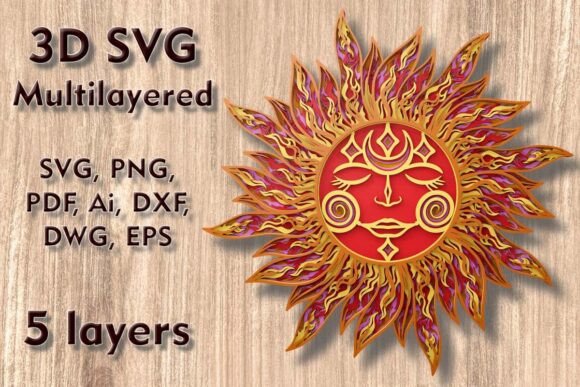
The Sun 3D SVG Multilayer Laser Cutting File is a digitally designed template that allows users to produce a three-dimensional sun using multiple layers. The concept is simple yet powerful: each layer contributes to the final look, giving your project depth, texture, and dimensionality. This multilayer approach is perfect for those looking to add a touch of elegance and complexity to their creations without requiring advanced skills.
This particular design features five distinct layers, which are carefully crafted to stack together seamlessly. When assembled, these layers create the illusion of a glowing, radiant sun — making it a popular choice for wall art, centerpieces, and even educational models in schools or workshops.
Key Features of the Sun 3D SVG Multilayer Laser Cutting File
- Size: The standard dimensions of the design are 280 x 277 mm (approximately 11 x 10.9 inches). This makes it suitable for most laser cutters and desktop cutting machines.
- Scalability: While the size can be easily increased to fit larger spaces, reducing the design should be done cautiously. Thin elements may break or lose structural integrity if scaled down too much.
- Compatibility: Designed to work with various cutting machines including Cricut, Silhouette, Glowforge, and CNC routers.
- Material Versatility: Can be used on a wide range of materials such as plywood, paper, cardstock, MDF, wood, acrylic, cardboard, and aluminum.
- File Formats: After purchasing, you receive a ZIP folder containing multiple file formats including SVG, layered SVG files, DXF, DWG, EPS, AI, PNG, and PDF, ensuring compatibility across platforms.
Purpose and Significance of the Design
At first glance, the Sun 3D SVG might seem like just another decorative element. However, its significance lies in how it bridges technology and creativity. The design is not only visually appealing but also highly functional, allowing for customization and application in various fields. Here’s why it matters:
- Creative Expression: Artists and hobbyists use this design to showcase their unique style through layered artwork. The sun motif is universally recognized and often symbolizes warmth, energy, and positivity, making it a meaningful addition to any creative piece.
- Educational Use: In classrooms or DIY tutorials, the Sun 3D SVG serves as an excellent example of how digital design translates into physical objects. It's a hands-on way to teach students about geometry, spatial awareness, and material properties.
- Commercial Applications: For small businesses and entrepreneurs, this design can be part of a product line for home décor, custom gifts, or seasonal items. Its versatility means it can be adapted for different markets and client preferences.
Why Choose a Multilayered Design?
A multilayered SVG offers more than just aesthetics. By stacking multiple layers, the design gains structure and form, enabling it to stand on its own or be mounted for display. This technique is especially useful when creating 3D effects from flat materials like wood or acrylic. Each layer plays a role in the overall composition, so precision is key during the cutting and assembly process.
For instance, one layer might represent the sun's core, while others contribute to the outer rays and patterns. When aligned correctly, the result is a cohesive and eye-catching piece that can transform a room or serve as a memorable gift.
How to Use the Sun 3D SVG Multilayer Laser Cutting File
If you're new to laser cutting or SVG-based designs, here's a step-by-step guide to get started with the Sun 3D SVG Multilayer Laser Cutting File:
- Select Your Material: Choose from recommended materials like plywood, acrylic, or cardstock. Thinner materials are ideal for detailed layers, while thicker ones provide sturdiness.
- Prepare Your Machine: Ensure your laser cutter or compatible machine is calibrated properly. Check the power settings depending on the material thickness and type.
- Download and Extract Files: After purchase, download the ZIP folder and extract the files. You'll find SVG, DXF, and other formats to suit your software needs.
- Design Alignment: Open the layered SVG file in your design software. Adjust the spacing between layers to ensure they will align well after cutting.
- Cutting Process: Cut each layer individually, keeping track of the order. Use a ruler or measuring tape to maintain accuracy.
- Assembly: Once all layers are cut, assemble them using glue, double-sided tape, or mounting tools. A slight gap between layers enhances the 3D effect.
- Finishing Touches: Paint, stain, or leave the design natural depending on your preference. Adding lighting behind the sun can create a dramatic glow effect.
Tips for Successful Project Creation
- Always test the design on a scrap piece before committing to the final material.
- Use a backing board for stability, especially if you're displaying the finished piece vertically.
- Label each layer before cutting to avoid confusion during assembly.
- Consider using contrasting colors or materials for the layers to highlight the depth of the design.
Practical Relevance in Modern Crafting and Business
With the rise of digital fabrication tools, the demand for high-quality SVG laser cutting files has never been higher. The Sun 3D SVG fits perfectly into this trend by offering a balance between simplicity and sophistication. Whether you're running a small business selling custom wall art or simply looking to decorate your home, this design provides a versatile solution.
One of the biggest advantages of using pre-made SVG files like the Sun 3D design is efficiency. Instead of designing from scratch, you can focus on the execution and personalization of the project. This saves time and resources while still delivering professional results.
Real-World Examples
Here are some ways people are using the Sun 3D SVG Multilayer Laser Cutting File in real life:
- Home Wall Art: Many crafters create large-scale versions of the sun design to hang in living rooms or bedrooms, adding a warm and artistic touch to their interiors.
- Seasonal Decorations: During holidays or special events, the sun design is customized with festive themes, such as a winter sun made from acrylic with LED lights.
- Wedding or Event Centerpieces: Brides and event planners use layered sun designs as elegant backdrops or table decorations, often incorporating gold or metallic finishes for luxury appeal.
- Gifts and Personalized Items: Handmade sun wall art or cards make thoughtful, personalized gifts for birthdays, anniversaries, or housewarmings.
Common Misconceptions About SVG Laser Cutting Files
Despite their popularity, many people have misconceptions about SVG files and their use in laser cutting. Let's clarify a few of them:
- Misconception 1: "SVG files are only for basic shapes."
Reality: SVG supports complex paths and layers, making it perfect for intricate designs like the Sun 3D SVG. With proper software, you can manipulate every detail. - Misconception 2: "Laser cutting is difficult and expensive."
Reality: Thanks to user-friendly SVG templates and affordable laser cutting machines like Glowforge or Cricut, laser cutting is now accessible to hobbyists and small businesses alike. - Misconception 3: "I need advanced skills to use these files."
Reality: While experience helps, many SVG files come with instructions and are designed to be intuitive. Beginners can follow along with online tutorials to achieve great results.
Choosing the Right Material for Your Sun 3D SVG
The beauty of the Sun 3D SVG is that it works with a variety of materials. Here's a breakdown of the options and their best uses:
- Plywood / MDF: Great for durable wall art or furniture accents. These materials hold paint and varnish well, making them ideal for long-lasting projects.
- Acrylic: Offers a clean, modern look and is perfect for illuminated displays. Acrylic sheets can be colored or transparent, adding a dynamic visual element.
- Cardstock / Paper: Best for lightweight, temporary pieces or prototypes. Ideal for testing the design before moving to sturdier materials.
- Aluminum: Provides a sleek, industrial feel and is suitable for commercial or architectural applications. Requires precise cutting due to its reflective surface.
Integrating the Sun 3D SVG Into Your Workflow
Whether you're a seasoned crafter or just starting out, integrating the Sun 3D SVG into your workflow can streamline your creative process. Here’s how it can fit into different aspects of modern life:
- Education: Teachers use layered SVG designs to demonstrate concepts in STEM classes, helping students visualize geometric principles in 3D form.
- Business: Entrepreneurs leverage these designs to create unique products for niche markets, such as bohemian-themed décor or minimalist art. Workshops & Tutorials: Craft studios and online platforms include the Sun 3D SVG in their kits for group activities or DIY challenges.
By incorporating such designs into your workflow, you not only improve productivity but also expand your creative possibilities. You can experiment with different color schemes, materials, and lighting effects to match your vision.
Technological Advancements Enabling Better Craftsmanship
Modern cutting machines like Cricut, Silhouette, and Glowforge offer high precision and ease of use, making it possible to bring digital designs to life effortlessly. The Sun 3D SVG takes advantage of these advancements by providing layered, scalable files that adapt to various machines and software programs.
Moreover, the availability of multiple file formats ensures that whether you're using Adobe Illustrator, CorelDRAW, or free software like Inkscape, you can work with the design efficiently. This cross-platform flexibility is crucial in today's digital crafting landscape, where accessibility and convenience matter more than ever.
Conclusion
The Sun 3D SVG Multilayer Laser Cutting File is more than just a design; it's a gateway to enhanced creativity and craftsmanship. Its five-layer structure, combined with support for various materials and machines, makes it a versatile asset for artists, educators, and entrepreneurs alike. Whether you're aiming to create a personalized gift, explore new artistic techniques, or start a small business, this design empowers you to do so with ease and professionalism.
So why wait? Upgrade your next project with the magic of the Sun Mandala SVG and discover the joy of bringing digital art into the physical world. With the right tools and a bit of imagination, you can turn a simple SVG file into a masterpiece that radiates warmth and beauty.