Pigeon Laser Engrave File: High-Resolution PNG for Professional Projects
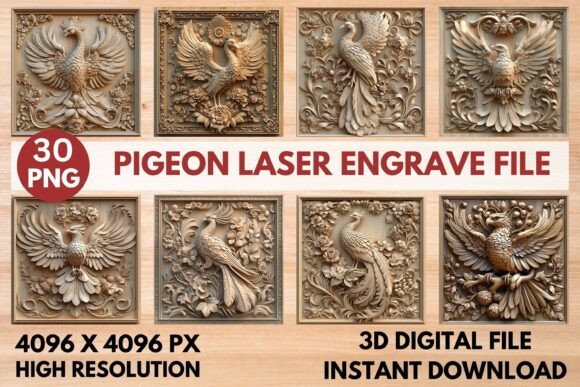
When you are looking to add a touch of whimsy and sophistication to your laser engraving projects, the Pigeon Laser Engrave File stands out as an exceptional resource. This isn't just another clipart image; it is a meticulously crafted digital asset designed specifically for the nuances of laser technology. Whether you are a seasoned pro running a high-volume production line or a hobbyist experimenting with your first CO2 machine, this design offers the precision and detail required to produce stunning results.
The core of this offering is its high-resolution PNG format, which ensures that every feather, shadow, and contour is rendered with clarity. By providing both grayscale and coloring options in 4096 x 4096 pixels, the file accommodates a wide variety of engraving techniques. It is particularly effective on light woods, where the subtle gradations of gray translate into rich, three-dimensional textures that mimic depth without the need for complex vector manipulation.
Why Choose a Grayscale PNG for Laser Engraving?
Understanding the difference between cutting files and engraving files is crucial for achieving professional-grade work. The Pigeon Laser Engrave File is explicitly designed as a raster-based engraving tool, not a vector cut file. This distinction matters because lasers interact with materials differently than they do with blades. A grayscale image allows the laser to vary its power based on the pixel density, creating a natural shading effect that feels organic and detailed.
This approach is ideal for artists who want to capture the intricate texture of pigeon feathers or the soft curves of a bird's form. Unlike solid black shapes that can sometimes appear harsh or flat, the dithered grayscale provided by this file uses a Jarvis filter to optimize burn quality. This means the transition from light to dark areas is smooth, preventing banding and ensuring a high-quality finish even on sensitive materials like birch plywood or maple.
Technical Specifications That Matter
One of the strongest advantages of this digital download is its technical readiness. You receive a ZIP file containing 15 unique designs, each available in two formats:
- 15 Coloring PNG Files (4096 x 4096 px): These allow for creative customization before engraving, letting you adjust hues if your software supports color mapping for dye-sublimation or specific laser effects.
- 15 Grayscale PNG Files (4096 x 4096 px): Optimized directly for engraving, these files leverage the full dynamic range of your machine’s power settings to create depth.
The transparent background feature is a significant time-saver. It eliminates the need for manual masking or background removal in your design software, allowing you to drag and drop the image directly into your workflow. While the files are not editable in terms of vector paths, their high resolution ensures that resizing them within reasonable limits maintains sharpness and detail.
Software Compatibility and Machine Settings
A common concern among users is whether a specific file will work with their equipment. The Pigeon Laser Engrave File is universally compatible with most major laser engraving software platforms, including LightBurn, xTool Creator, Glowforge App, Sculpfun SCS, and standard CO2 laser interfaces. However, optimal results depend on correct configuration.
For those using Glowforge, the recommended settings provide a great starting point for achieving max quality:
- Speed: 1000
- Power: 90
- Mode: Grayscale Vary Power
- Max Quality LPI: 270
- Passes: 1
- Masking: No Masking
If you are a LightBurn user, the recommendation is to stick with the grayscale PNGs. The software’s ability to interpret grayscale values into pulse-width modulation signals works beautifully with the Jarvis dithering included in these files. This combination ensures that the fine details of the pigeon design are preserved without over-burning the material. Always perform a small test patch on your chosen wood type to calibrate for variations in moisture content and density.
Practical Applications Across Industries
The versatility of this design extends far beyond simple decoration. Because pigeons are iconic symbols found in urban landscapes worldwide, this imagery resonates with a broad audience. Here is how different professionals can leverage the Pigeon Laser Engrave File:
Home Décor and Artisan Crafts
For makers selling on platforms like Etsy or at local craft fairs, this file opens up opportunities for unique home goods. Imagine engraved wooden wall art, custom picture frames, or decorative coasters featuring the detailed pigeon artwork. The high contrast and fine lines make it suitable for serving trays and cutting boards, provided food-safe finishes are applied after engraving. The artistic nature of the design elevates simple wood pieces into conversation-starting decor items.
Stationery and Paper Crafts
While primarily designed for lasers, the high-resolution nature of these PNGs also makes them excellent for digital printing. Creators can use the images for greeting cards, wedding invitations, or business cards. The grayscale versions can be printed in black and white for a classic look, while the coloring files offer flexibility for full-color designs. Additionally, the designs can be used with die-cutting machines if traced carefully, though the primary intent remains laser engraving.
Textiles and Fashion Prints
In the realm of fashion, this file can be adapted for fabric printing. The detailed line work translates well onto tote bags, t-shirts, and hats when paired with appropriate transfer methods. The urban aesthetic of the pigeon theme appeals to streetwear brands and independent designers looking for edgy yet sophisticated motifs. The ability to resize the 4096px files ensures that patterns can be tiled seamlessly for larger textile applications.
Educational and Marketing Materials
Educators and marketers can utilize these visuals for engaging presentations or branded merchandise. For example, a biology teacher might use the detailed engraving to discuss urban wildlife, while a marketing agency could create branded notebooks or USB drives featuring the design. The professional quality of the output reinforces brand credibility, showing attention to detail and a commitment to high standards.
Considerations for Buyers and Users
Before purchasing, it is important to understand the limitations and best practices associated with this product. First and foremost, this is a digital download only. No physical product will be shipped to you. You are buying the intellectual property rights to use these files for your own creations, subject to the shop’s licensing terms.
Additionally, since these are PNG files, they are not layered SVGs. If you need to modify individual elements of the pigeon design (such as moving a wing or changing the eye color), you would need to use vector editing software to trace the image manually, which requires advanced skills. For most engraving purposes, however, no modification is necessary. The files are ready to print and engrave immediately upon download.
Material selection plays a huge role in the final outcome. As noted in the recommendations, light woods such as basswood, maple, and birch yield the best results for grayscale engraving. Darker woods may require adjusted power settings to achieve visible contrast, and plastics should be tested cautiously to avoid melting or excessive smoke. Always ensure proper ventilation when working with any material during the engraving process.
Final Thoughts on Enhancing Your Workflow
The Pigeon Laser Engrave File represents a smart investment for anyone serious about laser engraving. By providing high-resolution, pre-dithered grayscale images, it removes the guesswork from setting up complex vector paths. The inclusion of multiple files in a single purchase allows for variety in your product line without the need to source new designs constantly.
Whether you are producing one-off custom gifts or manufacturing batches of branded merchandise, the consistency and quality offered by this PNG set will streamline your production process. The emphasis on sharp, detailed outcomes ensures that your customers receive products that look professionally made. With straightforward settings for popular machines like Glowforge and LightBurn, you can start creating beautiful, textured pigeon-themed engravings right away.
Remember to experiment with your specific machine’s capabilities. While the recommended settings provide a strong baseline, every laser has slight variations. Use the test patches to refine your speed and power until you achieve the perfect balance of detail and depth. With the Pigeon Laser Engrave File, the potential for creative expression is limited only by your imagination and the materials you choose to work with.